TL;DR
- We recommend Google Voice for solo founders and freelancers on a tight budget, because the personal plan is free and the $10/user Starter plan covers the basics without asking for a long-term commitment.
- We recommend LinkedPhone for small US and Canada-based teams who want a shared inbox for calls, texts, and voicemails without juggling three separate apps.
- We recommend Allo for small teams and sales teams who want AI baked into every plan (not an add-on) and CRM integrations that actually sync call recordings and transcripts.
- We recommend Dialpad for growing SMBs (think 20 to 200 people) who want a phone system with genuinely strong built-in AI.
- We recommend Zoom Phone for small businesses already living inside Zoom's ecosystem and who want their phone, meetings and chat under one login.
- We recommend Microsoft Teams Phone for Microsoft 365 shops willing to accept a more complex setup process in exchange for keeping calls inside Teams.
Introduction
Picking a phone system used to mean picking a desk phone. Now it means picking a stack: calling, texting, an AI receptionist, CRM sync, and (hopefully) a bill you can predict.
We tested and reviewed six VoIP phone systems built for or adopted by small businesses: Google Voice, LinkedPhone, Allo, Dialpad, Zoom Phone and Microsoft Teams Phone. Some are dedicated small business tools; others are the phone add-on to a suite you might already use. None of them fit every team the same way.
This guide walks through what each one does well, where it falls short, what it actually costs once you add the fees nobody puts on the pricing page, and how to think about the switch to VoIP if you haven't made it yet.
Summary table
| Tool | Recommended to | Starting monthly price | G2 rating | iOS rating | Play Store rating |
|---|---|---|---|---|---|
| Google Voice | Solopreneurs and Google Workspace users on a budget | Free (personal) / $10 per user (business) | 4.1/5 | 4.3/5 | 1.8/5 |
| LinkedPhone | Small US/Canada teams wanting a unified inbox | $19.99/month (1 user) | 3.5/5 | 4.7/5 | 3.8/5 |
| Allo | Small teams and sales teams wanting AI + CRM sync, no add-ons | $16/month (1 user, Starter) | 4.7/5 | 4.3/5 | 3.9/5 |
| Dialpad | Growing SMBs wanting strong built-in AI | $27/user/month | 4.4/5 | 4.6/5 | 3.2/5 |
| Zoom Phone | Teams already using Zoom | $18/user/month | 4.6/5 | Not published separately* | Not published separately* |
| Microsoft Teams Phone | Microsoft 365 shops | $10/user/month (tech only, calling plan extra) | 4.4/5 | 4.8/5 | 4.5/5 |
*Zoom's App Store rating covers the combined Zoom Workplace app, which includes Zoom Meetings, so it isn't Zoom Phone specific.
Google Voice: the free option that stays basic
Google Voice is the phone system most people have already touched, even if they didn't think of it that way. It's free for personal use tied to a Gmail address, and it's the reason a lot of solo consultants and side-hustlers never bothered shopping for anything else.
For actual business use, Google offers a Starter plan at $10 per user per month (up to 10 users, available in 14 countries), a Standard plan at $20 per user per month (unlimited users, on-demand call recording, call routing), and a Premier plan at $30 per user per month (automatic call recording, advanced reporting via BigQuery). Business plans require a Google Workspace subscription on top, which is easy to overlook when comparing raw prices.
The catch is the feature set. Google Voice only has two AI features: spam blocking and voicemail transcription. There's no AI receptionist, no call summaries, no CRM integrations of any kind. If your business runs on HubSpot or Salesforce, you'll be logging calls by hand.
What we'd flag before you buy:
- No customer support on the free personal version.
- Business use is limited to the US, Canada and a short list of supported countries.
- You can't always port an existing US number over.
Bottom line: Google Voice makes sense if your needs are simple (a working number, basic voicemail, and a price you'll never think twice about) and you don't need the phone system to talk to the rest of your tools.
LinkedPhone: one inbox for calls, texts and voicemail
LinkedPhone, started in 2017 by a small NYC based team, leans hard into the "everything in one shared inbox" pitch. Calls, texts, voicemails and emails between team members show up in a single place, with text auto-reply and missed call auto-reply built in.
Pricing is tied to number type rather than a traditional tiered plan: a local number runs $19.99 per month for one user, a toll-free number runs $29.99, and each additional user is $5 per month on either plan. There's a 7-day free trial and, refreshingly, no add-ons layered on top.
AI features are limited but free across the board: AI reply suggestions, call transcription and voicemail transcription. That's a smaller set than what Allo or Dialpad offer, but at least you're not paying extra for it.
What we'd flag before you buy: LinkedPhone only works in the US and Canada, has no CRM integrations beyond Zapier, and while we haven’t had any issues ourselves, a few online reviews mention frequent bugs. There's also no HIPAA compliance, which rules it out for healthcare-adjacent businesses.
Bottom line: a fair pick for a small, US-based team that wants one inbox and doesn't need CRM sync, international coverage or heavy AI.
Allo: AI phone system built mobile-first for small teams
Allo is built specifically for small teams and salespeople rather than retrofitted from an enterprise product.
Where Allo stands out is how much AI ships in the base experience: an AI answering service (in French, Spanish or English), call transcription and summaries across 36 languages, automatic follow-up email drafts, and an AI assistant you can ask questions of using your own call transcripts and SMS history as the source. All of it is included in the plan price. There's no separate AI add-on to negotiate, which is unusual on this list; most competitors charge extra for their AI receptionist.
The other differentiator is CRM depth. Allo has 18 native integrations, including HubSpot, Salesforce, Pipedrive, Attio, Notion, Zoho CRM and Apollo, and they sync call recordings, transcripts and contact updates back into the CRM rather than just logging that a call happened. Its HubSpot integration holds a 5/5 rating on the HubSpot marketplace across 200-plus installs, which is high compared to most tools on this list.
Pricing: the Starter plan is $16 per month for a single user (requires a 1-year commitment) and includes unlimited calls, a local number, AI summaries and IVR. The Business plan is $45 per user per month and unlocks integrations, unlimited AI answering, SMS and international calls. One phone number is included; extra numbers cost $5 per month. Cancellation is self-serve, no questions asked, and there's a 7-day free trial.
What we'd flag before you buy: integrations and the full AI receptionist are gated behind the Business plan, so the $16 Starter tier is closer to a solo-user option than a team plan. Being newer, Allo also may not suit large enterprises with complex, multi-department routing needs; call routing itself (simultaneous or cascade) is available only on Business.
Bottom line: if AI and CRM sync are the reason you're switching phone systems in the first place, Allo is worth shortlisting, especially for sales teams who live in their CRM.
Dialpad: the AI-first pick for growing teams
Dialpad's AI credentials go back further than most: founder Craig Walker previously built GrandCentral, the product Google acquired and turned into Google Voice.
That shows up in the feature set: call summaries, live coaching, call scoring and an AI support agent, all included free across plans and supporting 9 languages. Dialpad also runs three separate products (Connect, Support, and Sell) aimed at general use, support teams and sales teams respectively, each with its own pricing.
The Standard plan starts at $27 per user per month and includes unlimited calling within your home country plus the US and Canada, a local number, call forwarding, recording and up to 3 departments for call routing. The Pro plan is $35 per user per month and adds SSO, phone support and up to 25 departments. A 14-day free trial is available.
What we'd flag before you buy: several reviewers point to call quality issues and a steeper learning curve than a tool like Google Voice or LinkedPhone. Support response times also come up repeatedly in reviews, and the SMS approval process can be slower than expected.
Bottom line: a solid choice for a business between roughly 20 and a few hundred employees that wants AI coaching and analytics without paying a per-feature add-on tax, as long as you're prepared for a real onboarding curve.
Zoom Phone: the natural add-on if you already use Zoom
Zoom Phone launched in 2019 to sit alongside the video product most small businesses already know. If your team runs meetings on Zoom, adding Zoom Phone means one login, one app and one bill instead of stitching together a separate VoIP provider.
AI features are branded as "AI Companion" and include post-call summaries, voicemail transcription, voicemail task extraction, voicemail prioritization and SMS thread summaries, supporting 32 languages. The catch: the more advanced summary and task features are included in every plan, but the full AI Companion experience is reserved for the Pro Plus and Business Plus tiers.
The entry plan, US & CA Unlimited, is $18 per user per month and includes unlimited domestic calling, free SMS, a phone number, call recording and integrations (Salesforce and Slack among others). Pro Plus bundles in the full Zoom Workspace suite (Meetings, Team Chat, Docs, Mail) for $24 per user per month, and Business Plus adds more storage, larger meeting capacity and SSO for $29 per user per month. The free trial (7 days) only applies to the entry plan.
What we'd flag before you buy: Zoom Phone's HubSpot integration has a notably low 1.9/5 rating on the HubSpot marketplace across 179 reviews, and reviewers call out missing shared contacts on the mobile app plus a short onboarding window. Compared to Allo or Dialpad, Zoom Phone's AI answering capabilities (no true AI receptionist or AI IVR) are thinner.
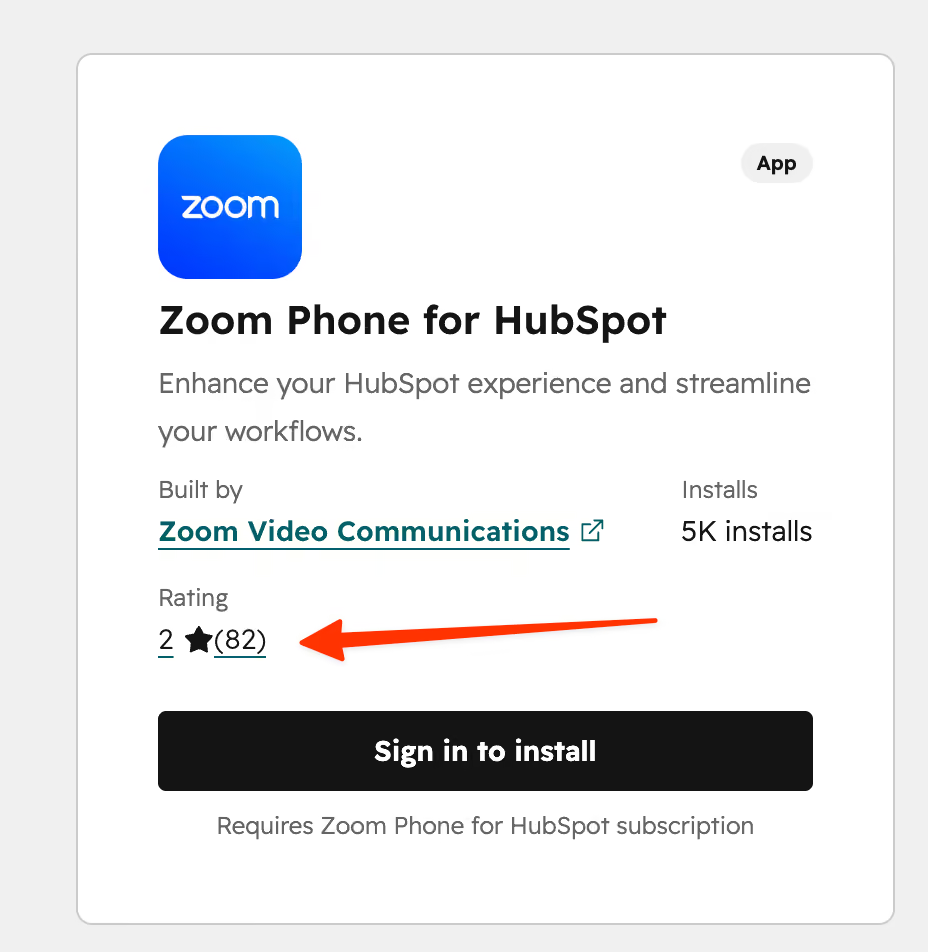
Caption: If you use HubSpot, Zoom phone will probably not be your best option
Bottom line: makes the most sense as an add-on for teams that are already committed to Zoom for meetings, less so as a standalone phone system chosen on its own merits.
Microsoft Teams Phone: powerful, but plan carefully
Microsoft Teams Phone extends Teams into a full calling solution, with Copilot integration letting you ask questions during or after a call and get answers pulled from the transcript.
The pricing structure is where this one gets complicated. Teams Phone Standard is $10 per user per month (paid yearly) but only covers the phone system technology itself, not calling minutes; you'll need a certified external provider or Microsoft's own calling add-ons for that. Teams Phone with pay-as-you-go calling is $13 per user per month, and Teams Phone with a Calling Plan (3,000 domestic minutes for the US, UK and Canada) is $17 per user per month. On top of that, you need a separate Microsoft Teams license starting at $4 per user per month, and the Copilot add-on for AI features costs another $30 per user per month. Add it all up and this becomes one of the more expensive options on this list, not the cheapest.
What we'd flag before you buy: in our own testing, the setup process was genuinely confusing, requiring you to juggle Microsoft 365 admin settings and Teams Phone settings separately, often being told mid-setup that you need to buy a number first and starting the process over. This will likely require an IT admin to configure properly. CRM integrations also lag behind dedicated VoIP tools; the HubSpot integration sits at 3.3/5, and there's no native Salesforce integration.
Bottom line: worth it if your business already runs on Microsoft 365 and you value keeping calls inside Teams more than you value a quick setup or a predictable monthly bill.
Conclusion
There's no single best VoIP phone system for every small business; the right pick depends on your budget, your existing tools, and how much you need AI to do the busywork for you.
- If your budget is close to zero and your needs are simple, Google Voice covers the basics.
- If you want one shared inbox for a small US-based team, LinkedPhone keeps things simple.
- If AI and CRM sync matter more than anything else, Allo and Dialpad both deliver, with Allo leaning toward small sales teams and Dialpad toward growing SMBs that want deeper analytics.
- If you're already committed to Zoom or Microsoft 365, Zoom Phone or Microsoft Teams Phone will save you from managing a separate app, as long as you go in with your eyes open about the added cost of AI features and integrations.
Whichever you choose, read the pricing page twice: the sticker price rarely includes AI add-ons, extra phone numbers or the per-user minimums that show up once you start comparing plans side by side.
What are the recommended phone systems for small businesses?
Google Voice, Allo, Dialpad, Zoom Phone and Microsoft Teams Phone all serve small businesses, but they suit different situations. Google Voice fits the tightest budgets, Allo and Dialpad fit teams that want AI and CRM sync built in, and Zoom Phone or Microsoft Teams Phone fit businesses already using those ecosystems.
How much does a small business VoIP phone system cost?
Entry-level plans on this list range from free (Google Voice's personal plan) to around $27 per user per month (Dialpad's Standard plan). Most paid business plans land between $10 and $20 per user per month at the entry tier, with advanced AI features, CRM integrations or additional phone numbers often priced separately.
Which criteria are critical when choosing a phone system?
Three things matter most: integrations, AI features and total pricing. On integrations, check whether the tool actually syncs call recordings and transcripts into your CRM, not just a call log entry. On AI, check whether the AI receptionist and transcription are included in your plan or billed as a per-minute add-on, since several tools on this list charge separately for their AI answering service. On pricing, look past the advertised number for per-user minimums, extra phone number fees, and calling plan costs that aren't bundled into the base price.
When is it recommended to switch to VoIP?
Common triggers include outgrowing a personal cell phone for business calls, needing call recording or transcripts for a growing sales team, or wanting a single number that can ring multiple people at once.

Updated on August 5, 2026
by Presti Team
The Presti editorial team, covering AI visual production for retail and e-commerce.