TL;DR
An AI image to video generator turns a still image into a moving clip. In 2026 the market splits in two: the models that generate the pixels, and the platforms that orchestrate those models and wrap them in a workflow. Pick a model to make a clip, pick a platform to run a pipeline.
- The best generation models are ByteDance Seedance (tops the public benchmark), Google's higher-ranked Gemini Omni Flash (resolution, audio, top short clips), xAI's Grok Imagine (fast, low-cost, and 4th on the arena), Kling (cinematic 4K on a budget), and Runway and Luma (creative and keyframe control). FLUX 3 is the newest engine to watch.
- The best orchestration platforms route to several of those models and add team features. Presti is best for retailers and brands, because it is tuned for on-brand product video at scale. Higgsfield is best for social, ad creative and also short movies, and Artlist is best for teams that want AI clips under one media license.
- Quick rule: use a raw model when you want direct control of one clip, and an orchestrator when you want many clips, many models and a repeatable process behind them. Even for one clip, orchestrator are relevant as they guide toward the right methodology (creating a storyboard with the location and character sheets).
Two layers hide behind every AI video
What if your best product photo could sell as hard as a 30-second ad? That is the promise of an AI image to video generator. You give it a still image, describe the motion, and it returns a short clip in minutes. No camera, no rig, no reshoot. In 2026 the leading tools hold shape, light and texture well enough for a live storefront or a social feed.
The mistake most comparisons make is to line up very different things in one list. So let us draw the line clearly. There are two layers in this market. The first is the generation models, the engines that actually make the pixels, from Google's Gemini Omni Flash to ByteDance's Seedance, plus challengers like Grok Imagine and FLUX 3. The second is the orchestration platforms, the products that route to several of those engines and add a workflow on top: Presti, Higgsfield and Artlist. A model is the camera. A platform is the studio around it.
This guide covers both layers, because the best AI image to video generator for you depends on which layer you are shopping in. Part one compares the leading models on benchmarks, clip length, resolution, audio and real cost. Part two compares the three platforms on the models they route to, their workflow and their price. Presti is our own product and sits in part two, so we keep its section factual.
How we compared these tools
We ran one hands-on test of our own on a real product shot (see "Our own test" below); otherwise the ranking scores come from independent public arenas, and every spec and price comes from each vendor's own pages, verified on 11 August 2026. Beyond the leaderboards, we compared on the criteria that decide whether a clip is usable.
- Fidelity from a still: does the motion keep the subject's shape, color and texture, or does the image drift?
- Clip length, resolution and audio: how long, at what resolution, and with or without sound?
- Control and consistency: keyframes, camera moves, multi-shot and brand consistency across clips.
- Rights and watermarks: can you use the output commercially, and does the free tier stamp a watermark?
- Real cost: the monthly bill translated into an approximate cost per clip, plus hidden gates like non-rolling credits.
One note on pricing. These tools sell credits, not clips, and a credit buys a different amount of video on each platform. We quote standard monthly billing in US dollars and a rough cost per clip where the vendor publishes enough to do so honestly, and we say so where they do not.
Part 1: The generation models, the engines that make the pixels
These models generate video themselves, rather than routing to someone else's engine. Runway and Luma each train and run their own family (Gen and Ray). Gemini Omni Flash, Kling and Seedance come from major labs (Google, Kuaishou and ByteDance), Grok Imagine from xAI, MiniMax H3 from MiniMax and Happy Horse from Alibaba, and FLUX 3 is Black Forest Labs' new multimodal model. The table below compares all nine side by side; the sections that follow profile the main engines in depth, while the newer arena challengers (Grok Imagine, MiniMax H3 and Happy Horse) stay in the table for now. If you want direct control of a single clip, you start here.
| Model (lab) | Best for | Clip, resolution, audio | Entry access (monthly) | Arena rank (AA i2v) | Watch-out |
|---|---|---|---|---|---|
| ByteDance Seedance | Multi-shot with references | 2.5: up to 30s; up to 720p; audio | No monthly plan; Dreamina ~$0.10/s at 720p, or per-second API in RMB | #1 as 2.0 (Elo 1,199) | 2.5 too new to rank yet |
| MiniMax H3 (Hailuo) | High-ranked all-rounder, 2K + audio | 5-15s, up to 2K, native stereo audio | Hailuo AI; ~$0.07-0.12/s | #2 (Elo 1,194) | Pay-as-you-go API |
| Google Gemini Omni Flash | Top-ranked short clips | 3-10s, 720p, native audio | Google AI Plus/Pro + API $0.10/s | #3 (Elo 1,192) | Short clips; preview status; SynthID |
| Grok Imagine 1.5 (xAI) | Fast, low-cost API clips | Up to ~10s, 720p, audio | API $0.14/s (720p) | #4 (Elo 1,116) | Preview; no stated commercial-use or watermark terms |
| Happy Horse (Alibaba) | Benchmark standout, image-to-video | Up to ~12s, 1080p, audio | Third-party APIs only | #5 (Elo 1,112) | Alibaba publishes no English specs; confirm before relying |
| Kling 3.0 (Kuaishou) | Cinematic 4K on a budget | 3-15s, up to native 4K, audio | Standard $8.80 (660 cr) | #13 (Elo 1,076) | Leads with first-month discounts |
| FLUX 3 (Black Forest Labs) | Multimodal: video, image, audio | Up to 20s, HD-FHD, native audio | API pay-as-you-go | Too new to rank | Video newly GA (Aug 2026) |
| Runway Gen-4.5 | Fast, director-style iteration | 2-10s, 720p; audio not stated | Standard $15 (625 cr) | Not ranked | 720p cap; short clips |
| Luma Ray3.2 | Keyframe control and HDR | 1080p, HDR (20s on V2V) | Plus $30 (10,000 cr) | Not ranked | Overlapping model versions; credits burn fast |
Sorted by Artificial Analysis image-to-video arena rank (Elo, blind human votes), read 11 August 2026. Standard monthly billing, USD. Seedance's ranked score is version 2.0; 2.5 and FLUX 3 are too new to place.
What the benchmarks show
We rank models on the Artificial Analysis image-to-video arena, where Elo scores come from blind, side-by-side human votes (a gap of about 100 Elo means one model beats the other roughly two times in three; gaps under ten are ties). The board is humbling for the famous names. When we read it on 11 August 2026, the leaders were ByteDance's Seedance 2.0 (Elo 1,199), MiniMax's H3 (1,194) and Google's Gemini Omni Flash (1,192), with xAI's Grok Imagine (1,116) close behind; Kling 3.0 sat 13th, while Runway and Luma were not ranked at all. A second leaderboard, arena.ai (1.6 million votes), shows the same podium.
Read any leaderboard as a starting filter, though, not a verdict. It measures general human preference on open prompts, not whether a clip keeps your product's exact shape, color and logo, so treat the ranks as a shortlist and run your own product shots through the two or three finalists before committing. We will refresh the table when the newest releases, Seedance 2.5 and FLUX 3, gather enough votes to place.
Our own test: FLUX 3 vs Seedance 2.5 vs Gemini Omni Flash vs Grok Imagine on product shots
Public arenas rank models on open-ended prompts, not on the job we care about: turning a real product photo into a clean, on-brand clip. So we ran our own side-by-side test on a real product shot, a fashion apparel look, animating it with the same prompt through FLUX 3, Seedance 2.5, Gemini Omni Flash and Grok Imagine 1.5. This is one product, an early look rather than a broad study. This is a small, hands-on test from our team, not a statistical benchmark; read it as a complement to the arena scores above.
How we tested
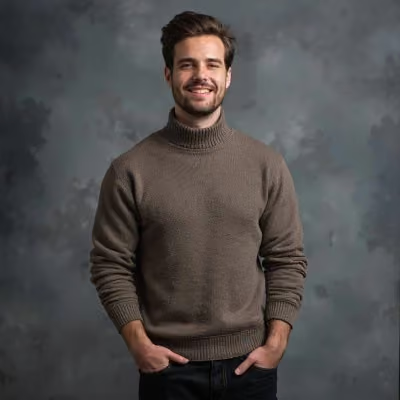
- Inputs: one apparel model shot, a heavy ribbed-knit emerald green cashmere sweater with pleated beige linen trousers on a concrete runway.
- Same prompt per image across the four models, at 720p in 5-second image-to-video clips, animated from the first frame.
- What we judged: product fidelity (shape, color, logo), motion realism, artifacts or distortion, and prompt adherence.
- How we scored: a single-pass review by a senior reviewer, rating each clip 1 to 5 per criterion on apparel texture, gait consistency and drape stability.
The exact prompt we used, identical across the four models:
Full-length tracking shot, a fashion model walking slowly toward the camera on a minimalist concrete runway. The model wears a heavy ribbed-knit oversized emerald green cashmere sweater and pleated beige linen trousers. Soft natural side lighting, shallow depth of field, 35mm lens. Realistic fabric drape, subtle natural movement of threads and cloth as the body moves, crisp texture, photorealistic.
We rendered every clip at 720p so the four models ran at an identical resolution.
Results at a glance
| Criterion | FLUX 3 | Seedance 2.5 | Gemini Omni Flash | Grok Imagine 1.5 |
|---|---|---|---|---|
| Product fidelity (shape, color, logo) | 4 (knit held tight) | 5 (pristine drape) ★ | 3 (color shift) | 2 (heavy warping) |
| Motion realism | 4 (smooth tracking) | 4 (natural gait) | 3 (floating step) | 2 (robotic posture) |
| Artifacts / distortion | 4 (minimal drift) | 5 (no morphing) | 3 (subtle flicker) | 2 (leg distortion) |
| Prompt adherence | 4 (solid tracking) | 5 (realistic fabric move) | 4 (good pacing) | 3 (limited movement) |
| Overall (our pick) | 4 | 5 ★ | 3 | 2 |
Our internal test, 11 August 2026. Scale 1 to 5 (5 = best); ★ marks our pick. Team judgement on product-video quality, not an arena score.
See it for yourself
The strongest evidence is the clips themselves. Below, the same product animated by all four models, side by side.
Test: fashion runway look (emerald ribbed-knit sweater, beige linen trousers)
Click on the videos you want to compare (pick at least 2)
Verdict: Seedance 2.5 kept the ribbed knit and linen pleats crisp as the model walked forward; FLUX 3 tracked smoothly with minimal texture loss; Gemini Omni Flash held pacing but showed fabric flicker and a slight color shift; Grok Imagine warped the knit and distorted the legs mid-stride.
What our test says
For apparel e-commerce video, we would pick Seedance 2.5. On our runway shot it held the complex textures, the heavy ribbing and the linen pleats, with realistic fabric sway and no visible distortion of the garment. FLUX 3 was a close, stable second, though its fabric motion looked slightly stiffer. Gemini Omni Flash kept good pacing but showed micro-flicker and a small color shift along the folds, and Grok Imagine struggled with anatomy and cloth physics as the model moved. This lines up with the public arena, where the Seedance line already tops the image-to-video board (ranked as 2.0); on our shot, 2.5 preserved garment structure best under camera motion.
What this is and isn't: a small hands-on test on one of our own product images, a fashion apparel look, run to see how these models handle commerce work specifically. It is not a statistical benchmark, and results depend on the prompt and the product. Treat it as our field experience next to the public arena scores.
Google Gemini Omni Flash
Gemini Omni Flash is Google's other video model, and it is easy to confuse with Veo old generation models, so here is the line: Google frames it as the first of a new Omni family, a fast generate-and-edit model that is separate from Veo. It animates an uploaded image, adds native audio, and outputs 720p clips at 24 frames a second, from 3 to 10 seconds long. What makes it notable is the data: on both public arenas it lands in the top three to four, above Veo 3.1, which makes it Google's strongest option for short, sound-on clips today. Every output carries an invisible SynthID watermark. Google itself publishes no arena ranking, so the standing comes from the independent boards, not a marketing claim.
Best for: short, high-preference clips with audio, especially for teams already in the Google AI ecosystem.
Where it falls short: clips cap at 10 seconds and 720p, and it is still a preview model with limits likely to change.
Pricing: Gemini Omni Flash rolls out to Google AI Plus, Pro and Ultra subscribers, plus some YouTube surfaces, and the API costs $0.10 a second, so a 10-second clip is about $1.00.
Kling AI
Kling, made by Kuaishou, punches above its price. Its current 3.0 series (launched 5 February 2026) animates an uploaded image into a 3 to 15 second clip at up to native 4K, with a multi-shot storyboard mode (Director Mode) that generates several shots with film-like transitions in one pass, native audio, and a character-consistency feature. For image-to-video quality per dollar, Kling is one of the strongest options here. Its rough edge is transparency: the headline prices lead with first-month discounts that mask the true recurring cost, so we quote the standard renewal figures Kling publishes in its credit-cost guide. The free Basic tier is not licensed for commercial use; commercial rights start on the paid tiers.
Best for: creators who want cinematic 4K and multi-shot sequences at a low entry price.
Where it falls short: pricing that leads with first-month discounts, and a free tier not licensed for commercial use.
Pricing: On standard renewal (above the first-month promos), tiers run $8.80/660 credits (Standard), $32.56/3,000 (Pro), $80.96/8,000 (Premier) and $159.99/26,000 (Ultra). At 30 credits a second for 4K, Standard's 660 credits are about 33 baseline 720p videos a month.
ByteDance Seedance
Seedance is ByteDance's video model, and on the data it is the strongest in this guide: it sits first on the Artificial Analysis image-to-video arena we cited above. It is also the reference-heavy, multi-shot specialist of the group. Seedance 2.0 accepts up to nine images, three video clips and three audio clips as input, and returns a 15-second multi-shot clip with dual-channel audio. The newer Seedance 2.5, released on 31 July 2026, generates up to 30-second single-shot videos, though its generation interface currently tops out at 720p, below the 1080p of Seedance 1.0. Image-to-video is a core input path. ByteDance's own tech report states that the earlier Seedance 1.0 ranked first on the Artificial Analysis text-to-video and image-to-video leaderboards in June 2025, so its benchmark strength is not new. You reach Seedance through ByteDance's consumer apps, Dreamina and CapCut, which give free daily credits, and through the Volcengine API.
Best for: creators who want multi-shot clips built from several reference images and strong benchmark-grade fidelity.
Where it falls short: Seedance 2.5 currently outputs only up to 720p, below the 1080p some rivals reach, and it lists no monthly subscription tier, only a per-second rate.
Pricing: Dreamina and CapCut start free with daily credits, then bill by credit; Dreamina's own page prices Seedance 2.5 at about $0.10 a second at 720p (its normalized annual-plan figure, roughly $2.90 for a 30-second clip), but does not list the monthly subscription tiers. The Volcengine API is usage-based, billed per call and tiered by duration and resolution with volume discounts of 10 to 30%; Volcengine announced about 1 RMB a second for Seedance 2.0, widely reported in Chinese tech press.
Runway
Runway trains its own engine and wraps it in a creative suite built for filmmakers, editors and marketers who want to direct the shot. Its current flagship, Gen-4.5, shipped on 1 December 2025 and animates an uploaded image into a 2 to 10 second clip at 720p, in several aspect ratios including 9:16 and 21:9, with motion controls and fast iteration. It rewards a try-tweak-try workflow. The trade-offs are length and resolution: Gen-4.5 tops out at 720p and 10 seconds in-app, so it suits short, punchy motion. Runway states that content you create is yours to use without non-commercial restrictions from them, though the free plan watermarks every clip.
Best for: creative and marketing teams that want director-style control and fast iteration on short clips.
Where it falls short: 720p and up to 10 seconds in-app, and a watermarked free tier.
Pricing: Free plan: 125 one-time credits, watermarked. Paid monthly: Standard $15/625 credits, Pro $35/2,250, Max $95/9,500. At 12 credits a second, Standard buys about ten 5-second clips; the API is $0.01 a credit, so a 5-second clip is near $0.60.
Luma Dream Machine
Luma's Dream Machine runs the Ray3 family (Ray3.2 is the current model as of June 2026) and is the control freak's pick, in the best sense. It animates an uploaded image at 1080p, with up to 20 seconds on its video-to-video mode, and its standout is precision: up to sixteen keyframes to choreograph motion, a Reframe tool for any aspect ratio, and native HDR with 16-bit EXR export for a real post-production pipeline. Two things to watch: Luma lists more than one Ray3 point release (it calls Ray3.2 current but also lists a Ray3.14), so check which model your plan defaults to, and credits burn at very different rates by model and by HDR. The free tier is draft-resolution, watermarked and licensed for personal use only.
Best for: creators and small studios that want keyframe control, HDR output and an API-first workflow.
Where it falls short: overlapping model versions muddy the pricing picture, and higher-fidelity settings spend credits fast.
Pricing: Plus is $30/10,000 credits, Pro $90/40,000, Ultra $300/150,000, all with commercial use. A 5-second 720p clip on Ray3.14 is about 100 credits, so Plus buys roughly 100 a month; the separate API runs about $0.30 for 5s at 720p and $1.20 at 1080p.
FLUX 3 (Black Forest Labs)
FLUX 3 is Black Forest Labs' bid to do everything in one model: image, video, audio, even robot actions. On video it animates an uploaded image with native audio, up to 20 seconds, at HD and FHD (roughly 720p and 1080p, which Black Forest Labs states in megapixels). It launched on 23 July 2026 in early access, and its video generation is now live through Black Forest Labs' API and dashboard on pay-as-you-go, not a subscription (reported as generally available in early August 2026). It does not yet appear on the two public arenas we track, so there is no independent score for it there. Black Forest Labs reports its own preference tests, in which FLUX 3 was chosen over Seedance 2.0 and Gemini Omni Flash about 52% of the time, a near tie; we treat that as a vendor claim, not a benchmark.
Best for: developers who want image, video and audio from one API and prefer usage-based pricing.
Where it falls short: no independent benchmark to lean on yet, and its image generation and open weights are still rolling out.
Pricing. Pay-as-you-go, with no free tier: image-to-video is $0.17 a second at HD and $0.29 at FHD, so a 5-second HD clip is about $0.85. You pay per second from the first clip, which suits pipelines but means no free trial credits.
Part 2: The orchestration platforms, one workflow, many models
An orchestration platform does not train its own foundation model. Instead it routes each job to a fitting third-party engine, then adds the layer a business actually needs: a consistent look, team review, brand assets and a repeatable process. The interesting part is that all three platforms below draw on the same menu of models from part one (Omni, Kling, Flux, Seedance and more), so the difference is not the raw engine, it is the workflow wrapped around it and who that workflow is built for.
| Platform | Best for | Routes to (models) | Entry paid plan (monthly) | Free tier | Watch-out |
|---|---|---|---|---|---|
| Presti | Retailers and brands: on-brand product video at scale | Omni, Veo, Kling, Seedance, Grok | Pro $99 (1,000 credits, ~33 videos, ~$3/video) | Yes, 60 credits (~2 videos) | Built for commerce, not open-ended cinema |
| Higgsfield | Social and ad creative, camera-motion control | Veo, Kling, Sora, Seedance, Wan, Hailuo, Grok (20+) | Starter €19 (270 credits) | Yes, watermarked | Seedance 2.5 gated to Plus+; prices localize |
| Artlist | Content teams wanting AI plus stock under one license | Kling, Veo, Seedance, Wan, Hailuo, Grok | Video from €19.99 (16,500 cr) | Yes, sample (1 video) | Entry €15.99 tier is voiceover-only |
Standard monthly billing, verified 11 August 2026. Presti in USD; Higgsfield and Artlist localize by region (euro figures shown, VAT excluded).
Presti
Full disclosure: Presti is our own tool. We hold this section to the same factual standard as the others, quote the same public pricing, and are upfront about where it is not the right fit.
Presti is our AI visual production platform for product photography and video at scale. You give it a product photo, and an agent plans, generates and delivers the visuals. On the video side it covers image-to-video, animated packshot videos and 360° spins. Like the other platforms here, Presti routes each task to a fitting engine rather than locking you to one model, and the models it draws on include Omni, Kling and Seedance, plus image models such as Nano Banana Pro and GPT Image 2. So you pick the shot you want, and Presti picks the model.
What sets Presti apart in this group is its focus. Higgsfield and Artlist are built for broad creative and content work; Presti is built for commerce. If you are a retailer, marketplace or brand that needs product videos faithful to the real item and consistent across a catalog, that focus is the point. A Brand Skill encodes your visual identity once, so a large set of clips stays on-brand. The workspace adds roles, in-context comments and approval flows, and custom integrations plus API access are available on Enterprise to push assets into a catalog.
Best for: retailers and brands that need product videos, 360° spins and animated packshots that stay on-brand across a catalog, with team review built in.
Where it falls short: Presti routes to a focused set of engines rather than every model on the market, and it is tuned for commerce, not open-ended cinematic storytelling. You also budget in credits, so it takes a moment to map a plan to your real output.
Pricing: A free plan gives 60 credits a month, about two videos or up to 20 images. Pro is $99 a month for 1,000 credits, roughly 33 videos or about $3 a video if you spend only on video, with a one-month rollover. Enterprise moves to volume pricing from $0.20 per credit with SSO, custom integrations and API access. A video costs 30 credits and an image costs 3. Presti's pricing page shows video output at 1080p and up to 15 seconds.
Higgsfield
Higgsfield is an AI-native creative suite aimed at social, campaign and ad work. It offers image-to-video, including a Draw to Video tool, and layers strong control features on top, such as camera-motion presets and a Cinema Studio. Under the hood it is a broad orchestrator: one credit balance covers what it advertises as 20+ models, and its stack names Kling 3.0, Seedance 2.0 and 2.5, Wan, Hailuo and Grok, among others. If your job is a steady stream of eye-catching social and ad creative, and you want many models plus motion control in one place, Higgsfield concentrates that well.
The breadth is the appeal and the caveat. With so many models and control layers, it is more creative playground than catalog production line, so a team that only needs consistent product clips may find it wider than the job requires. On rights, Higgsfield does not claim ownership of your outputs and permits commercial use, including ads and client work; free accounts get a visible watermark that every paid plan removes.
Best for: social and ad creators who want many models plus camera-motion control in one credit balance.
Where it falls short: the creative breadth is less specialised for consistent, high-volume catalog production, and the free tier is watermarked.
Pricing: A free trial exists with a visible watermark. On its monthly plans (shown in euros, before VAT), Higgsfield lists Starter at €19 for 270 credits, Plus at €59 for 1,200 credits, and Ultra at €129 for 3,000 credits; the newest model, Seedance 2.5, is gated to Plus and above. As a credit reference, Higgsfield's own plan pages equate Starter's 270 credits to roughly 15 Seedance 2.0 Fast videos, and price a 720p Seedance 2.0 clip at about 22 credits per 5 seconds. Prices localize to your region.
Artlist
Artlist is a content platform that pairs a large stock media catalog with an AI toolkit, so its AI video generator sits next to royalty-free music, footage and templates under one roof. It offers image-to-video and, like the others, routes to a menu of third-party models, listing Kling, Seedance, Wan, Hailuo and Grok. The distinctive part is licensing: every paid AI plan includes Artlist's Pro license, and the same commercial framework that covers its stock assets extends to AI output, so a team gets one clear license for use across ads, client and brand work. That suits marketers and content teams who already license stock and want their AI clips cleared the same way.
The trade-off is that Artlist is built around content and licensing breadth, not product-catalog production, so it does not offer the brand-consistency and catalog workflow a retailer leans on. One licensing detail to note: Artlist grants you rights to the AI output for use across your video projects, including social, broadcast and client work, under its Pro license.
Best for: marketers and content teams that want AI video and stock media cleared under one commercial license.
Where it falls short: less specialised for consistent product-catalog work, and the exact credit cost per clip varies by model and is not cleanly published.
Pricing: On standard monthly billing (shown in euros, localizing to your region), AI Starter runs €15.99 for 7,500 credits, but that entry tier is voiceover-only (no video or images); usable video starts at €19.99 for 16,500 credits, or the AI Creator tier from €69.99 for 80,000 credits, with higher AI Professional and Pro Plus tiers scaling into the hundreds and thousands for very high volume. A free tier gives a small sample, including one video. Because each model consumes a different number of credits, we do not quote a single cost per clip; confirm the per-model rate for the engine you plan to use.
Which AI image to video generator should you choose in 2026
Start with the layer, then the tool. Do you want to make a clip, or run a pipeline?
- Pick a model when you want direct control of a single clip. Choose Seedance for benchmark-leading quality, MiniMax H3 for high-resolution clips with audio, Gemini Omni Flash for top-ranked short clips, Grok Imagine for fast, low-cost API clips, Kling for cinematic 4K on a budget, FLUX 3 for a multimodal API, Runway for fast iteration, and Luma for keyframe control.
- Pick an orchestration platform when you want many clips, many models and a repeatable process. Choose Presti if you are a retailer or brand that needs on-brand product video, 360° spins and packshots at catalog scale.
- Choose Higgsfield for social and ad creative with heavy motion control, and Artlist if you want AI clips and stock media cleared under one commercial license.
Whichever layer you land in, test it on your own images first. Fidelity to your real subject, clip length, resolution and commercial rights matter more than any headline feature. Start on a free tier, animate a handful of your hardest images, and only then commit a plan.
What is the best AI image to video generator in 2026?
It depends on whether you want a model or a platform. Among models, ByteDance Seedance leads the current public benchmark, MiniMax H3 offers high-resolution clips with audio, and Kling offers cinematic 4K on a budget. Among orchestration platforms, Presti is best for on-brand product video, Higgsfield for social and ad creative, and Artlist for AI clips cleared under one media license.
What is the difference between a video model and an orchestration platform?
A model, like Omni, Flux or Seedance, generates the video itself. An orchestration platform, like Presti, Higgsfield or Artlist, does not train its own model; it routes your job to one of those engines and adds a workflow, such as brand consistency, team review and licensing. A model is the camera, a platform is the studio around it.
Which AI image to video tool is best for product and e-commerce videos?
For product videos, the priority is fidelity to the real item and consistency across a catalog. Presti is built for this, with packshot videos, 360° spins and a Brand Skill that keeps output on-brand, and it routes to strong engines like Omni, Kling and Seedance behind the scenes. A general model can produce good product motion too, but you take on the work of keeping every clip faithful and consistent yourself.
Do I need a platform, or can I use the model directly?
If you make a handful of clips and enjoy directing each one, using a model directly through its app or API is cheaper and more hands-on. If you produce many clips, need a consistent look, or have a team and a review process, an orchestration platform saves time and keeps quality even. Many teams use both, a platform for volume and a model directly for a hero shot.
How much do AI image to video generators cost?
Model access starts around $8.80 a month for Kling and $15 for Runway, up to $30 for Luma Plus, while Gemini Omni Flash comes through a Google AI subscription and models like Seedance, Grok Imagine and FLUX 3 bill per second on their APIs rather than a flat subscription. Platforms range from about €19 a month for Higgsfield Starter and €19.99 for Artlist's entry video tier up to $99 for Presti Pro (Higgsfield and Artlist price in euros by region). Translated to a rough cost per short clip, most land between about $0.30 and $3.00, though 4K and audio push that higher.
Are AI-generated videos free to use commercially?
It depends on the tool and the plan. Runway, Kling, Luma, Presti, Higgsfield and Artlist grant commercial use on paid tiers, while limiting or watermarking free output. Google and OpenAI apply provenance watermarks (SynthID and C2PA) and state commercial terms less plainly, so check their service terms first. This is not legal advice, so confirm each vendor's current terms for your use case.
Updated on August 13, 2026
by Marc Goodwin
Works with e-commerce brands at Presti to turn visual content into revenue. His day-to-day is catalog visuals at scale, from what converts on a product page to what a photoshoot really costs and which tools hold up beyond the demo. Based in Pittsburgh.
Ready to enrich your entire catalog?
See how Presti generates every visual your PDPs need at any scale, automatically.