TL;DR
The best AI product photography tool in 2026 depends on what you sell and how much you produce. There is no universal winner, so we compared six tools across the jobs ecommerce teams actually run: cutouts, lifestyle scenes, on-model shots and video. Our three headline picks:
- Claid AI is best for fidelity-critical catalogs, because its AI keeps logos, labels and shape intact while generating scenes and on-model shots at volume.
- Presti is best for brand and content teams producing at scale, because you brief it in plain language and it generates on-brand images and video across a whole catalog.
- Photoroom is best for solo founders and small sellers, because it turns a phone photo into a clean, listing-ready image on mobile from $9.99/month.
The tables below cover all six tools we compared: Claid AI, Presti, Photoroom, Flair AI, Mokker AI and Rewarx Studio.
Why this comparison exists
In ecommerce, the image is the product. Shoppers can't hold what you sell, so the photo does the selling. UX research from the Baymard Institute found that the first thing 56% of shoppers do on a product page is look at the images, before the title or the description. Little wonder that, according to the World Federation of Advertisers, 78% of brands now use AI-generated or AI-enhanced content in marketing, with product images the single most common use at 87%.
Traditional shoots still produce beautiful work, but the economics are hard at catalog scale. Across 2026 pricing guides, a basic white-background image runs about $25 to $75, styled lifestyle shots $100 to $500 or more, and a full-day studio session well into the thousands. AI product photography software brings the per-image cost down to a few dollars or less, which is why most growing brands now run a hybrid: AI for volume, real photography for the flagship few.
We build in this category, so we follow these tools closely. This guide is the most complete breakdown we could produce: how we compared them, a quick comparison, a deep dive per tool, a full feature matrix, guidance by industry, and an expanded FAQ. We include our own product, Presti, and hold it to exactly the same standard as the rest, strengths and weaknesses alike.
How we compared these tools
We wanted a comparison you can trust, so we set a few ground rules.
- Official sources for every fact. Every price and feature claim was checked on the vendor's own pages on August 10, 2026. Anything we could not confirm on an official source is marked [verify] rather than repeated from a secondhand roundup.
- Compared across four jobs. We looked at each tool through the four jobs a real catalog needs, clean cutouts, lifestyle scenes, on-model output and video, rather than a single hero image, so the comparison reflects day-to-day ecommerce work.
- Grounded in category experience. We build in this space, so our read on each tool's strengths and limits draws on working in AI product imagery alongside each vendor's documentation and sample output.
- Our own bias, stated. Presti is our product. We flag that openly and apply the same criteria and the same "where it falls short" section to it as to every competitor.
The state of AI product photography in 2026
Three shifts define the category this year, and they shape which tools are safe bets.
- Consolidation has started. soona acquired Mokker (the generative-AI studio founded in 2019 as Zerolens) back in 2024, and Mokker still runs standalone while also powering soona's own tools. It is a sign the space is maturing from single features into platforms.
- Serious money backs the leaders. Photoroom counts Y Combinator and AI pioneer Yann LeCun among its backers, and Presti raised a $3.5M seed from Partech and Y Combinator, so the tools you adopt now are likely to keep shipping and supporting you.
- Adoption is mainstream, and buyers notice. According to the World Federation of Advertisers, 78% of brands now use AI-generated or AI-enhanced content in marketing, and product images are the single most common use at 87%. That matters because images do the selling: Baymard Institute found the first thing 56% of shoppers do on a product page is look at the images. The open question is no longer whether to use AI, but how to use it well.
Quick comparison
Prices in USD, monthly billing unless noted, from each vendor's pricing page on August 10, 2026. They vary by region, promotion and app store, so confirm at checkout.
What 150 product images a month actually costs
Headline prices only mean something once you translate them into a real monthly bill. Below is what it costs to generate about 150 product images a month, no video, on each tool's cheapest plan that covers that volume, on standard monthly billing (not discounted annual plans, since most people start month to month). Euro-based plans are converted at about $1.08 per euro as of August 2026.
At this volume, Photoroom and Mokker AI are the cheapest routes, for cutout-led and studio-style work respectively. Claid AI, Presti, Flair AI and Rewarx cluster in the roughly $40 to $60 range, which is broadly what you pay for on-model output, video or higher fidelity. The economics shift again past ~150 images a month: Flair moves to higher Scale tiers and Presti to add-on credits or a custom plan, so re-check the math at your real volume. These are generation prices only; expiring credits, per-session batch caps and separately billed APIs still move the final number, which is why we say read the pricing page twice.
Claid AI: product fidelity for catalogs and fashion
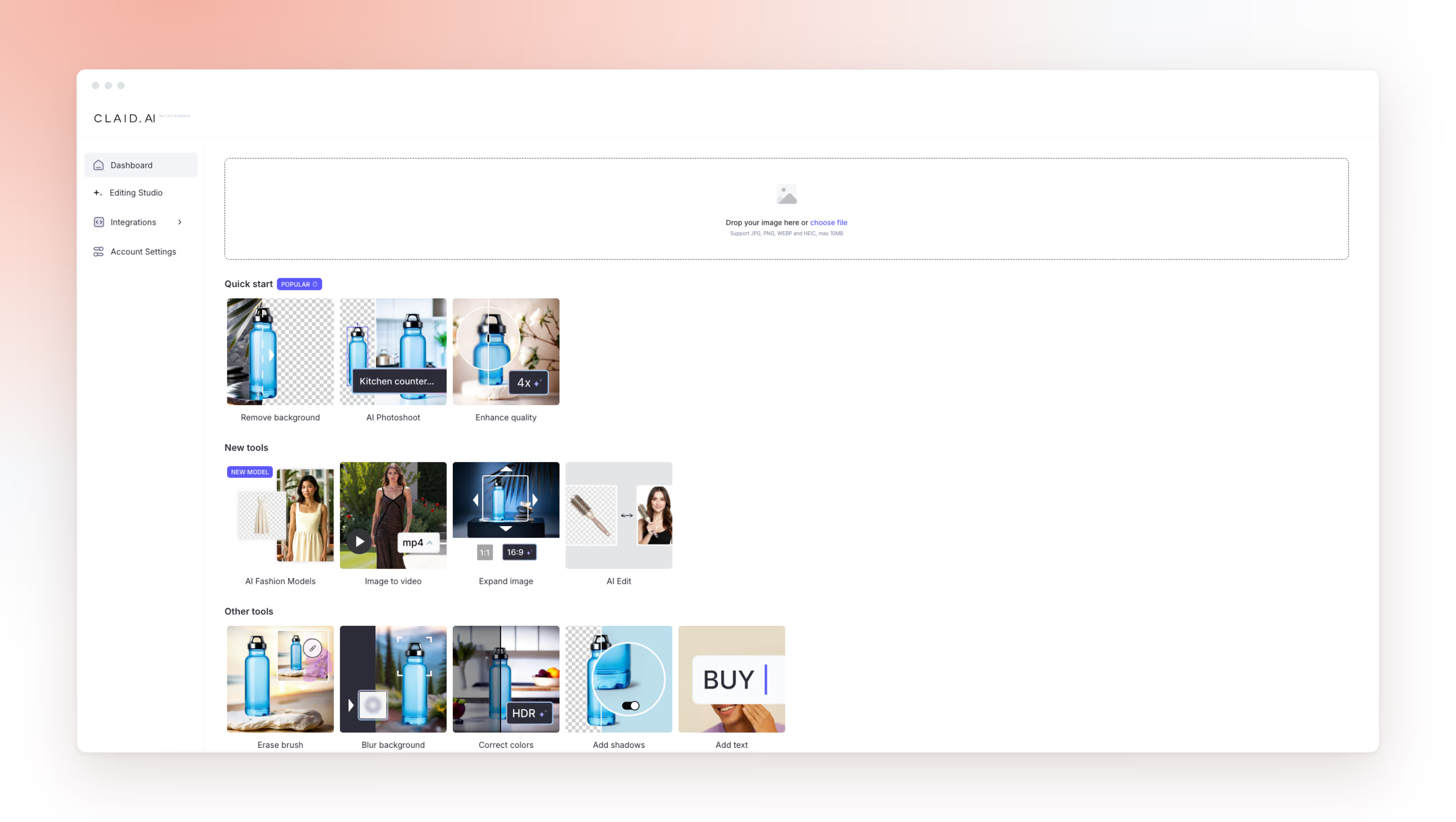
What it is. Claid AI is a product photography AI suite built by the team behind the upscaling tool Let's Enhance, and that heritage shows in cutout and resolution quality. Its core, AI Photoshoot, turns a single product photo into clean catalog shots and lifestyle scenes, and its AI Fashion Models place a garment on an AI-generated model. It also handles background removal, upscaling, light and color correction, outpainting and image-to-video, and its AI is tuned to preserve logos, branding and shape, which is why marketplaces and catalog teams reach for it. Claid lists Rappi, Zepto and Kasta among its customers.
Pricing. Credit-based, with two separate systems for web and API. A free trial includes 50 credits. Paid tiers are Essential (from about $15/month), Pro ($49/month) and a custom Business plan. All paid plans include 2K output; 4K is on the top tier. Credits do not roll over.
Best for: ecommerce and marketplace teams where a distorted logo or the wrong product shape is unacceptable, and apparel brands that need on-model shots without a studio.
Where it falls short: the credit model gets expensive at very high volume, and the split web/API pricing makes forecasting harder. Creative mode can occasionally shift a product's angle, so hero shots may need a review pass, and low-resolution inputs limit results.
Presti: a brief-driven agent for image and video at scale
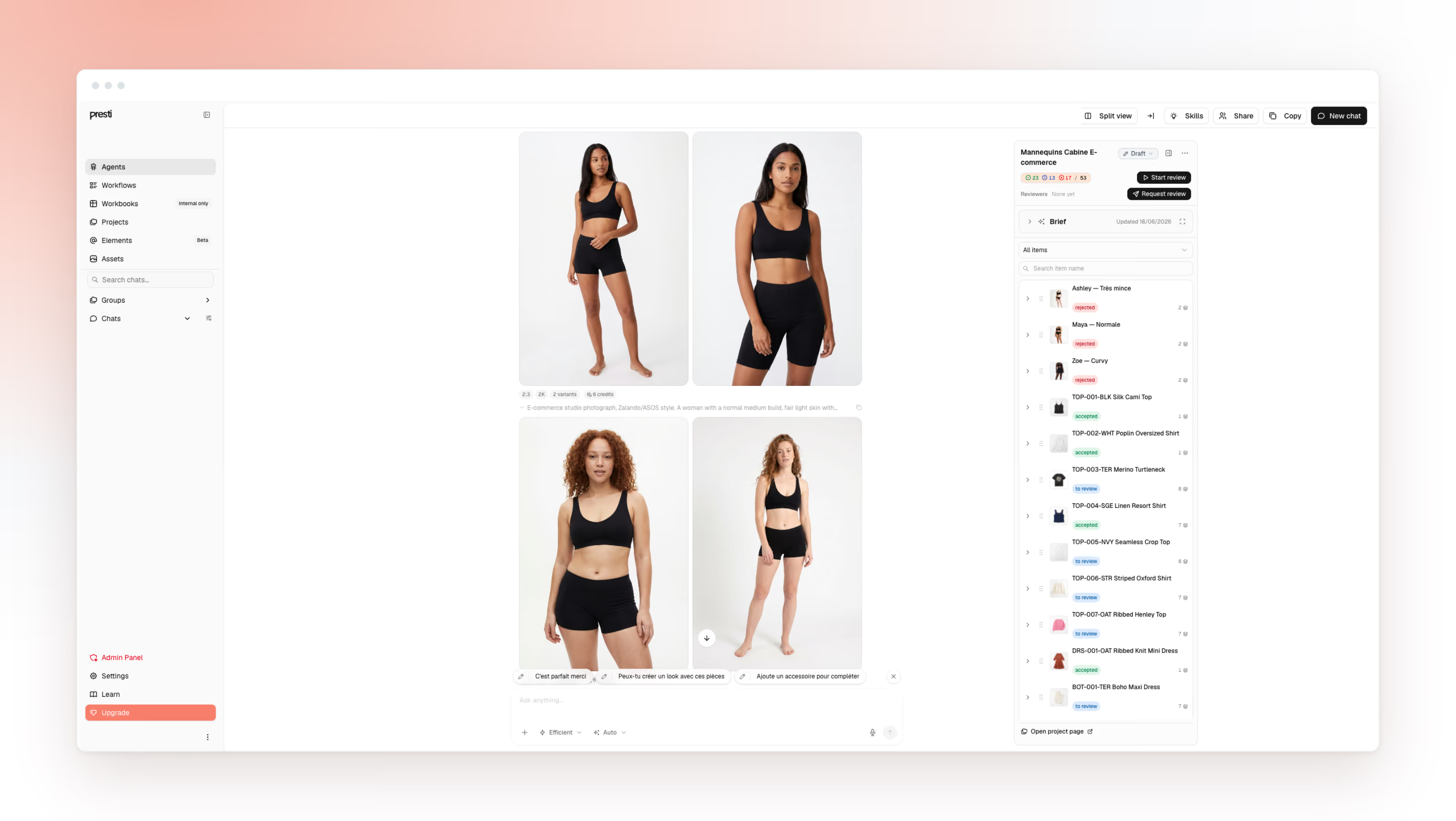
What it is. Presti (operated by Teker AI SAS, Paris) began in the furniture world and has grown into a broader ecommerce tool that behaves like a production agent rather than a single-image editor. You describe what you need and attach what you have; it generates images and video, routing each task to one of several third-party generative models under the hood, a multi-model approach its own terms confirm (naming providers such as Kling AI for video). It generates on-model shots with AI models, exports up to 8K via upscaling, and offers an API for automation. The workflow is built to keep a look consistent across many products. Presti says it is used by 400+ retailers and manufacturers, including Wayfair, Ashley Furniture, But and JJA Group, and it is backed by Partech and Y Combinator.
Pricing. Credit-based. The Free plan gives 60 credits a month (about 20 images or 2 videos), no card required. Pro is $49/month for 500 credits; one image is 3 credits, one video 30, and unused credits roll over for a month on monthly plans. Some third-party roundups still show Presti's older furniture-era pricing in the hundreds of dollars; the figures here are from Presti's own site.
Best for: brand, ecommerce and content teams producing image and video across many products and channels, where consistency and throughput matter more than one-off manual control.
Where it falls short: the agent approach is more than a hobbyist editing one product a month needs; for a quick phone cutout, a lighter mobile tool is faster. Like any generative tool, complex or highly reflective products can need a second pass, and the API's finer implementation details are best confirmed with the team for a specific integration.
Photoroom: the fast, mobile-first editor for sellers
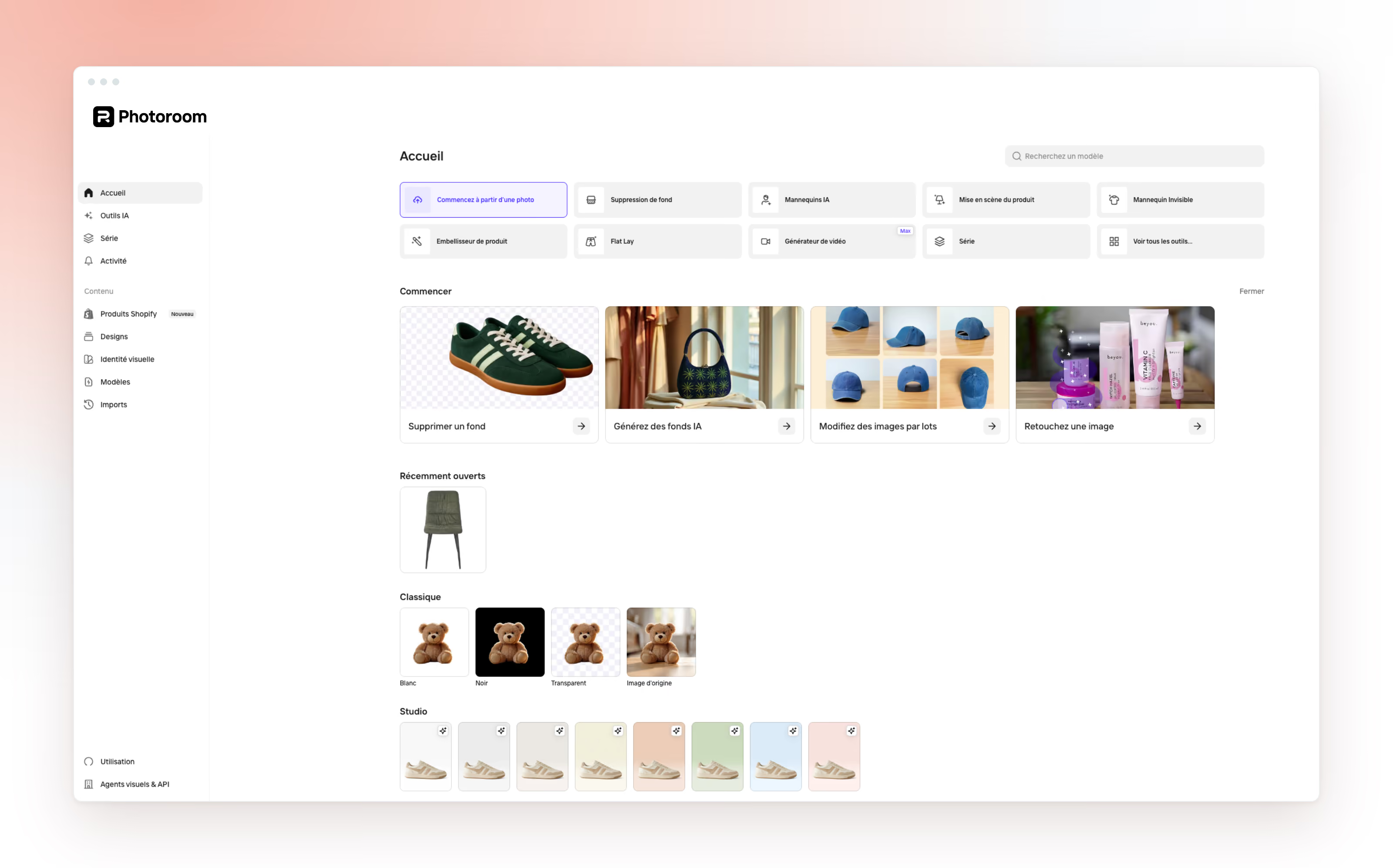
What it is. Photoroom is an AI product photography app built around speed and simplicity, on mobile and web. It started as a background remover and grew into a full commerce toolkit: AI backgrounds, Product Staging, Virtual Model, Ghost Mannequin, Flat Lay and AI Shadows, with category-tuned models. It also offers a separate REST API with Zapier and Make integrations, and reports more than 150 million downloads.
Pricing. Among the cheapest serious options. Free includes watermarked, non-commercial exports. On standard monthly billing, Pro is $9.99/month (about $5.99 effective on annual billing) and includes up to 1,600 AI image generations plus a pool of AI credits; Max is $26.99/month (up to 5,000 generations) and adds the video generator; Ultra is $99/month (up to 15,000 generations) and unlocks 4K; a custom Enterprise plan sits above. On the lower tiers, 4K and adjustable AI shadows are gated, batch has per-session limits (50 on Pro, 250 on Max), and the API is billed separately per image. Prices shown on the US site in USD; the France site lists Pro at 9.99€.
Best for: solo founders and small to mid Shopify or marketplace brands who want clean, marketplace-ready images from a phone.
Where it falls short: AI lifestyle scenes can look artificial on complex or reflective products, and the $9.99 headline hides real costs once AI credits, batch caps and separate API billing stack up.
Flair AI: a creative canvas for hands-on control
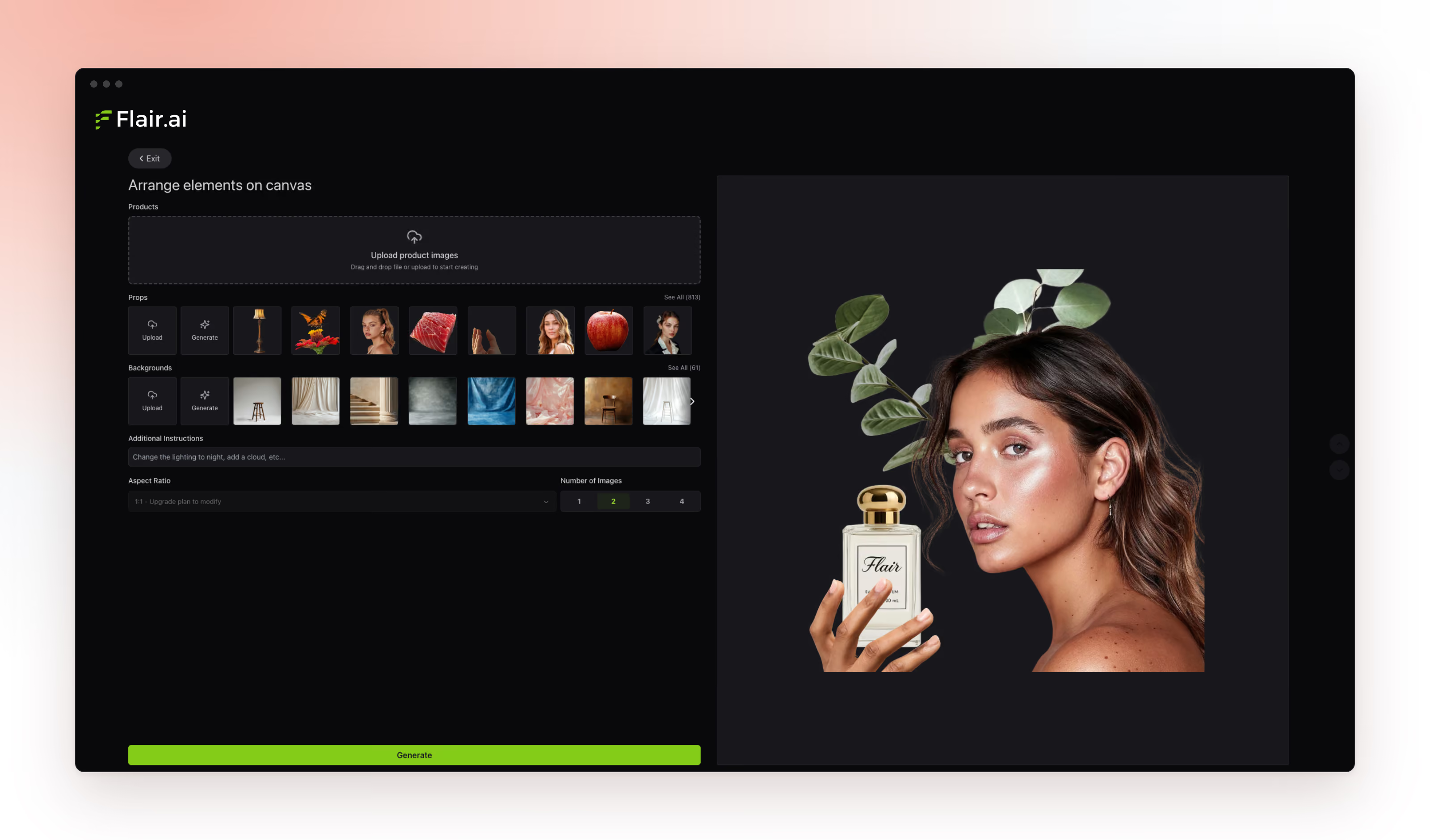
What it is. Flair AI gives you a drag-and-drop scene canvas: arrange your product alongside props and 3D assets, then adjust lighting and camera angle before generating. It also covers AI fashion models and a human builder, virtual try-on, upscaling, variations, short AI product videos, bulk generation, reusable templates and real-time team collaboration, with an API on higher tiers.
Pricing. Freemium, on monthly billing: Free ($0, 5 generated images), Pro ($10), Pro+ ($35, 80 generated images, adds a commercial license), Scale ($55, Tier 1 = 150 generated images, with API early access and higher tiers on a slider), and a custom Enterprise plan. The commercial license only starts at Pro+, and video generations are metered per tier (2 on Pro, 3 on Pro+, 5 on Scale).
Best for: marketers, designers and agencies who want to art-direct a shot and produce ad creatives and social variations at pace.
Where it falls short: product fidelity is a known weak point, with more risk of distortion on fine text or reflective surfaces, so test your hardest product first.
Mokker AI: fast studio and white-background shots
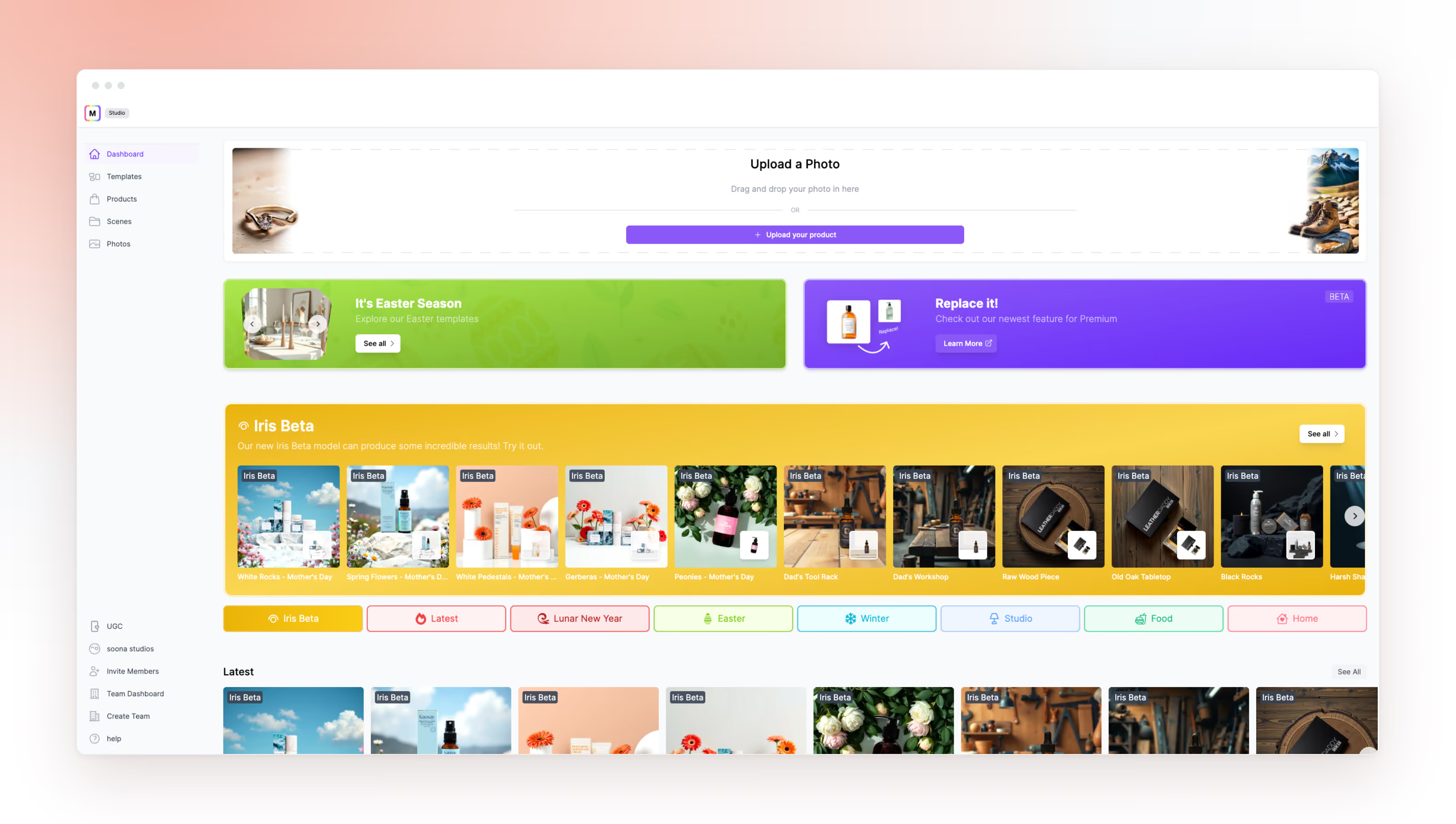
What it is. Mokker AI is a product-photo generator focused on one job done well: upload a single photo, and it removes the background and drops the product into a clean, category-aware studio or lifestyle scene, with realistic shadows, reflections and lighting. It ships 100+ templates, batch processing for whole catalogs, and high-resolution, print-ready output, and it slots into Amazon and Shopify listing workflows. Founded in 2019 (as Zerolens), Mokker is used by 350,000+ brands and was acquired by soona in 2024; it still runs standalone at mokker.ai.
Pricing. A free plan gives 20 one-time photos with full studio and template access, no card. Starter is $13/month, Team is $29/user/month (500 photos, high-quality export, custom prompts), and Organization starts at about $83.25/user/month for 5+ seats with unlimited photos. Annual billing saves roughly 35%.
Best for: sellers who need fast, reliable studio and white-background images at volume, especially for marketplace main images.
Where it falls short: it is deliberately narrow. There is no on-model try-on and no video, and background variety is more limited than a drag-and-drop editor, so it works best as one tool in a stack rather than a complete solution. The API is in early access.
Rewarx Studio: a full studio suite tuned by industry
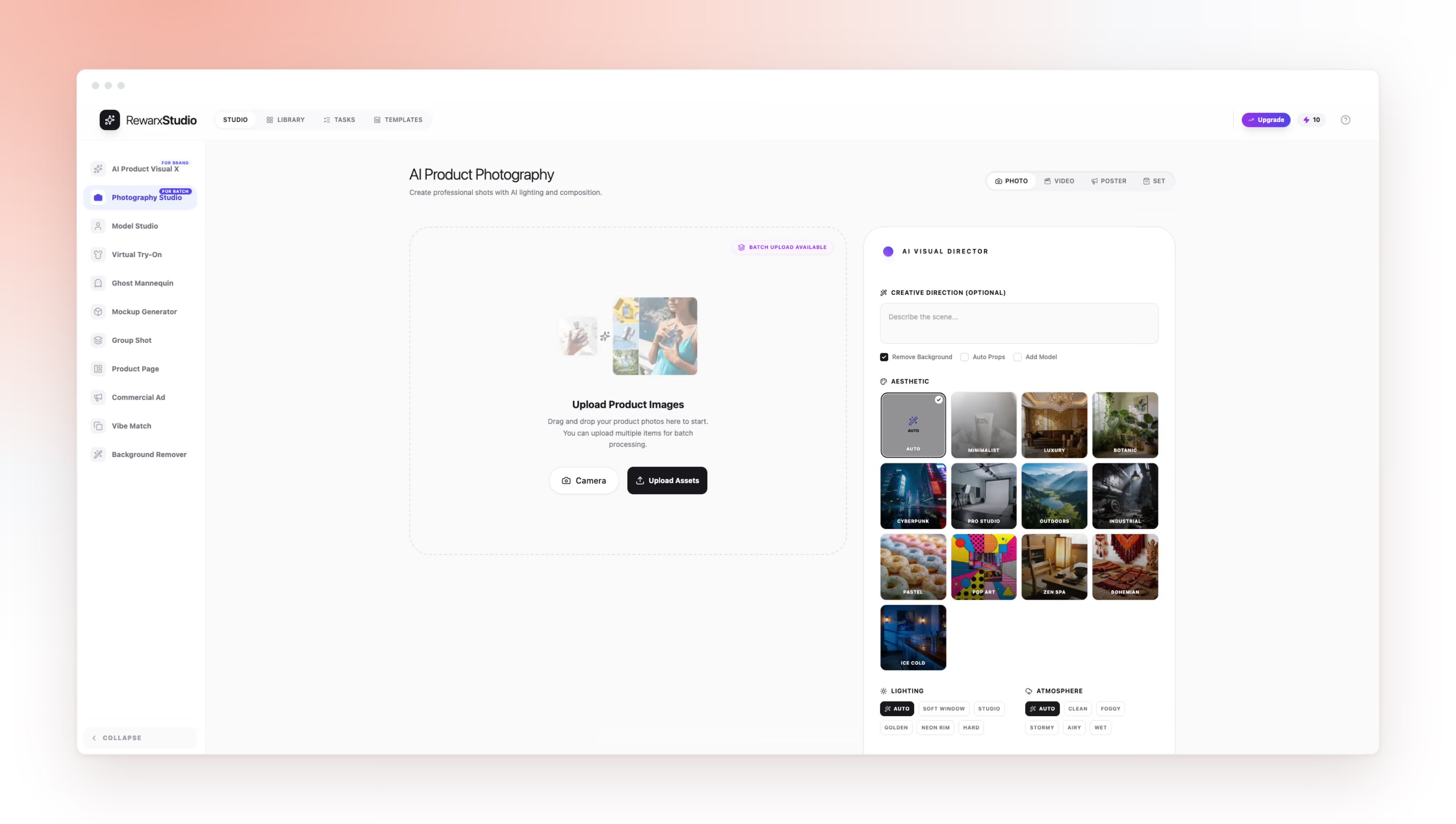
What it is. Rewarx Studio is a broad AI product photography suite that markets itself as fine-tuned for 20-plus industries (electronics, cosmetics, fashion, jewelry, home decor, beverages), with control over lighting, depth and material textures. Its modules span an AI Photography Studio, AI Model Studio (on-model with realistic shadows), AI Ghost Mannequin, AI Virtual Try-on, AI Mockup Generator, AI Group Shot Studio, background removal and an AI Product Page Builder that outputs a full listing asset set in one click. It targets 4K commercial assets and batch production for Amazon, Shopify, Etsy and eBay.
Pricing. Credit-based, billed in euros, with a free trial. On monthly billing: Starter 9.90€ (100 credits), Growth 54.90€ (200 credits, bulk-optimized), Scale 129.90€ (500 credits, multi-SKU) and Agency 249.90€ (1,000 credits, API access, multi-user). The credit model is transparent: 1 credit is a standard 1K image, a 4K image is 3 credits, and a video is 20 credits, so a plan's real image capacity depends on the resolution and mix you choose.
Best for: catalog teams that want one suite covering on-model, ghost mannequin, mockups and listing assets, with industry-specific tuning.
Where it falls short: the lack of public pricing makes it hard to budget before a sales conversation because you need to create an account first, and a broad feature set means some modules are stronger than others, so test the specific module you need.
Feature-by-feature comparison
Legend: “✓” available on an official source, “—” not offered or not a listed feature, Checked August 10, 2026.
Which tool by industry
The right pick shifts with what you sell. Here is where each type of catalog tends to land, based on how each tool is built and positioned.
- Fashion and apparel: you need on-model or ghost-mannequin output. Claid AI, Flair AI and Rewarx all generate on-model shots; Photoroom and Rewarx handle ghost mannequin.
- Beauty and cosmetics: small, often reflective items where fidelity and clean studio backgrounds win. Mokker AI for fast white-background shots, Claid AI when label accuracy is critical.
- Home, decor and furniture: lifestyle context sells the product. Presti and Rewarx generate room-context scenes at scale; Flair AI when you want to art-direct the set.
- Food and beverage: appetizing lifestyle scenes and reflective surfaces. Mokker's category-aware scenes and Claid AI's fidelity both fit; test reflections carefully.
- High-volume marketplace catalogs: batch throughput and consistency dominate. Presti for image and video at scale, Claid AI for fidelity across many SKUs, Photoroom Ultra for high-volume mobile prep.
Where AI still struggles
AI product photography has closed most of the gap with a studio, but a few things still trip up every tool on this list, and they are worth knowing before you trust a generated hero image.
- Texture and draping. Changing how a fabric falls, folds or catches light convincingly still takes many iterations; generators drift on weave, sheen and drape.
- Exact dimensions with multiple products. When several items share one frame, keeping each one's real proportions and scale accurate is unreliable, so size relationships can quietly break. This matters commercially: Baymard found 42% of shoppers use a product's images to judge its size, so a scale error is a conversion risk, not just a cosmetic one.
- Precise positioning. Placing a product in an exact, repeatable position, for a template, a set or a brand layout, is hard to pin down; small shifts creep in between generations.
These are industry-wide limits, not one tool's flaw. At Presti, they are exactly what our skills system is built to tame: reusable, brand-specific rules that constrain the output and, with a few iterations, bring texture, scale and positioning much closer to what a catalog actually needs.
One more thing to plan for: transparency. Getty Images reports that nearly 90% of consumers want to know when an image was created with AI, so build disclosure into your marketplace and ad workflows rather than bolting it on later.
How to choose
- List your jobs first. Cutouts only, or do you need lifestyle, on-model and video? The matrix tells you which tools qualify.
- Match to scale. A solo shop wants a cheap mobile editor (Photoroom, Mokker); a growing brand wants fidelity and consistency (Claid AI, Presti); an agency wants creative control (Flair AI); a broad catalog wants a full suite (Rewarx, Presti).
- Test your hardest product. Run a reflective, detailed or logo-heavy item through your shortlist before committing.
- Read the pricing page twice. Credits, batch caps, extra resolution and separately billed APIs are where the real cost hides.
Pick one tool for your primary use case, prove it on your real catalog, and add a second only when volume justifies it. Subscribing to everything at once is the most common and most expensive mistake we see.
Sources: each vendor's official pricing and product pages, read on August 10, 2026. Prices vary by region, promotion and app store and may change. Items marked [verify] were not confirmed on an official page and should be checked before publishing. This article reflects the Presti team's research and category experience and is not financial or legal advice.
What is the best AI product photography tool in 2026?
There is no single best tool. Photoroom and Mokker AI lead on fast, cheap studio and cutout work, Claid AI leads on fidelity, Flair AI on creative control, Rewarx on breadth of studio modules, and Presti on producing image and video at scale. Match the tool to your volume, channels and the jobs you actually run.
How much do AI product photography tools cost?
Entry pricing in 2026 runs from free (usually watermarked or capped) to around $50/month for team plans, with some suites priced only on request. Photoroom starts at $9.99/month, Flair AI from about $10, Claid AI from about $15, Mokker AI at $13, Rewarx Studio from about ~$11 (9.90€) and Presti at $49/month for 500 credits with a free tier. Watch credits and separate API fees, since the headline price rarely reflects your true cost at volume.
Can AI product photography replace a real photo shoot?
For much routine catalog work, yes: clean packshots, lifestyle scenes and on-model shots are well within reach. Hero imagery for high-consideration products, where fine texture and materiality drive the purchase, can still benefit from a real shoot. Most teams blend the two, using AI for volume and photography for the flagship few.
Are AI-generated product photos allowed on Amazon and other marketplaces?
Generally yes, as long as the image accurately represents the actual product and follows each marketplace's rules, such as a pure white background and no watermarks on the main image. Lifestyle and secondary images face fewer restrictions. Check the current guidelines for each channel; Amazon's public guide to product photos is a good starting point.
Which AI product photography tool is best for fashion and on-model shots?
For on-model output, Claid AI, Flair AI, Rewarx Studio and Presti all generate garments on AI models, and Photoroom and Rewarx offer ghost-mannequin effects. Claid AI is the safer pick when preserving fabric detail and logos matters; Flair AI suits art-directed campaign shots. Always test with your actual garment, since fine prints and lettering are the hardest thing for AI to keep accurate.
Which tool is best for a large catalog?
For large catalogs, batch throughput, visual consistency and API access matter more than any single feature. Presti is built to produce image and video across many SKUs while staying consistent, Claid AI delivers fidelity at volume with an API, and Mokker AI re-backgrounds whole catalogs fast. Weigh batch caps and per-image economics, and run a representative slice before committing.

Updated on August 10, 2026
by Marc Goodwin
Works with e-commerce brands at Presti to turn visual content into revenue. His day-to-day is catalog visuals at scale, from what converts on a product page to what a photoshoot really costs and which tools hold up beyond the demo. Based in Pittsburgh.

Ready to enrich your entire catalog?
See how Presti generates every visual your PDPs need at any scale, automatically.